Email
The screen allows you to set the criteria required for email configuration.
- Click on the gear “
 ” icon on the top right corner of the application.
- Click Settings.
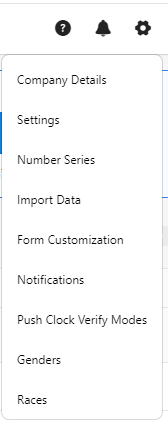
- Click on Email.
- You can configure the following in the email settings.
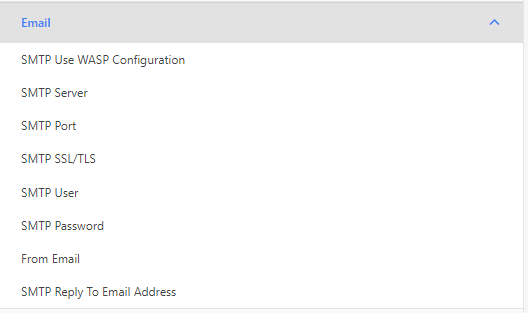
- SMTP Use WASP Configuration - Click on the checkbox to enable the SMTP Wasp Configuration.

- SMTP Server - Enter the name of an outgoing mail server that supports SMTP for delivering emails.
- SMTP Port - Enter the SMTP mail server listening port here. The default port is 25.
- SMTP SSL/TSL - Turn this option on for all SMTP servers that require SSL or TSL, including Gmail SMTP servers.
Note on using Gmail: To use a Gmail SMTP server to send out mail from PreciseTime:
- Go to www.gmail.com and set up your Gmail account.
- Have your IT department open ports 587 and 465 on your computer.
- Turn on the SMTP SSL/TSL option, and set up the other SMTP related options.
- The Gmail SMTP server address is smtp.gmail.com. The SMTP user should be 'yourgmailname@gmail.com' (don't forget @gmail.com).
- The SMTP Password is your Gmail account password.
Please be aware that you need to turn this option on for all SMTP servers that require SSL or TSL, not just for Gmail SMTP servers.
- SMTP User - If your SMTP server requires authentication to send outgoing mail, enter the username here.
- SMTP Password - If your SMTP server requires authentication to send outgoing mail, enter the password here. If your server does not require a password, leave this field blank.
- From Email - This is the email address from which emails are issued from PreciseTime. Set up a dedicated email account to use.
- SMTP Reply to Email Address - Enter the address to which users can reply to emails sent via PreciseTime.
- Validate SMTP - After entering your SMTP settings, you can click the Validate SMTP button to have PreciseTime attempt to use the settings.
- Click Save.
