View Profile
The View Profile option allows you to access and review your personal profile information. Accessing the view profile option requires you to be logged in to their account.
- Login to the application.
- Click on Profile Picture located in the top right corner of the screen.
- Click on the Username.
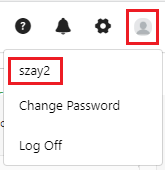
- The screen navigates to the View/Edit Employee screen.

- You can edit the required information.
Note: Depending on the permission set for your role, you can view, add, edit, and delete the details.
- Apart from updating personal information, the Profile picture has Change Password and Log Off options.
👉Refer to the topic - Change Password and Log Off.
